Q2 Fall 2025

Week 10 | Oct 20 - 24 | Edit Week 10 - Rotate Days / Change Dates or Style [must be logged in]

Welcome to Class! 

Today is the day to -

Click HERE for Engineering EQ Towers Info Sheet

View Full Page

Welcome to class -

Today's Tasks for our Engineering Earthquake Towers
  • Step 3: Develop a Solution
    • Create your detailed design solution - drawing with annotations about how your balsa wood and popsicle sticks will be utilized
  • Step 4: Construct and Test
    • Develop your working model or prototype
Click HERE for Engineering EQ Towers Info Sheet
Click HERE for Engineering Report and make a copy for you and your team to fill out as you do this project. You must complete the problem statement, design statement, research, brainstorming, and drawings before you can construct your buildings.

View Full Page

Welcome to Class - it's great to be back!

Today we will start by having each team present their research from last week.
Next, we introduce and start our Engineering Earthquake Towers Challenge:
  • Define the problem
  • Generate Concepts
    • Research
    • Ideas
    • Concept Sketches with Annotations
Click HERE for Engineering EQ Towers Info Sheet
Click HERE for Engineering Report and make a copy for you and your team to fill out as you do this project. You must complete the problem statement, design statement, research, brainstorming, and drawings before you can construct your buildings.

View Full Page

This content is password-protected. To view it, please enter the password below.

View Full Page

This content is password-protected. To view it, please enter the password below.

View Full Page

Week 11 | Oct 27 - Oct 31 | Edit Week 11 - Rotate Days / Change Dates or Style [must be logged in]

Welcome to Class!!

Today we are learning about:

      •  Mechanical System Efficiency
      • What is a breadboard and multimeter?
      • How do we set up a winch to measure Mechanical System Efficiency?
  • Make sure Week 11 is finished in your portfolio
  • Show Mrs. Moore your completed portfolio and earn ER Time (Explore and Refresh Time)

View Full Page

Welcome Back!  

Today's objectives:

         1) Present your Earthquake Tower Project Report
          2)  We are learning about:
      •  Mechanical System Efficiency
      • What is a breadboard and multimeter?
      • How do we set up a winch to measure Mechanical System Efficiency?

View Full Page

Welcome to Class!

Today is the day to SHAKE our TOWERS

  • Make sure your tower is ready to go, it has the weights on it, etc.
  • Finish up your engineering project report
  • Is your portfolio updated for today? Make sure to add a link to your completed engineering project report in today's comments.


View Full Page

Welcome to Class!! This is our LAST DAY to build!

  • Finish the EQ Towers
  • Finish Engineering Report for EQ Towers
  • Make sure Week 11 is set up in your portfolio


View Full Page

Welcome Back -

Today these are our TASKS:

  • Finish the EQ Towers
  • Finish Engineering Report for EQ Towers
  • Make sure Week 10 is done in your portfolio
  • Create Week 11 in your portfolio

View Full Page

Week 12 | Nov 3 - Nov 7 | Edit Week 12- Rotate Days / Change Dates or Style [must be logged in]

WELCOME TO CLASS!

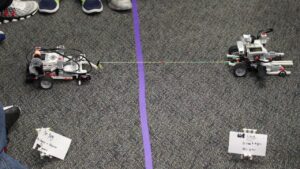
Day 3   : TUG-OF-WAR ROBOT BATTLE PROJECT

  • Click HERE for the Gantt Chart for our Project Timeline
      • What are we working on today?
        • Construct Prototype
        • Update Week 12 in your portfolio

View Full Page

WELCOME TO CLASS!

Day 2 : TUG-OF-WAR ROBOT BATTLE PROJECT
    • Click HERE for the Gantt Chart for our Project Timeline
      • What are we working on today?
        • Finish Research/Decision Matrix
        • Sketch of final design - show Mrs. LaMarche
        • Start designing your prototype

View Full Page

WELCOME TO CLASS!

Day 1 : TUG-OF-WAR ROBOT BATTLE PROJECT

  • Click HERE for the Gantt Chart for our Project Timeline
      • What are we working on today?
        • Design Brief
        • Research
        • Decision Matrix
        • Final Design
        • Construct Prototype
Click HERE to access the Engineering Report for this project. You need to make a copy of this document and share it with your team.

View Full Page

Welcome to Class!

  • Finish 1.1.6 Maximizing Power Activity

  • Today's challenge: TUG-OF-WAR ROBOT BATTLE

    • Click HERE for the Gantt Chart for our Project Timeline
      • What are we working on today?
    • Click HERE to access the Engineering Report for this project. You need to make a copy of this document and share it with your team.


View Full Page

Welcome to Class!

  • Today's challenge: 1.1.6 Maximizing Power @ Constant Voltage

    • Work through Activity together 
    • No Load Performance vs Stall Performance

View Full Page

Week 13 | Nov 10 - Nov 14 | Edit Week 13 - Rotate Days / Change Dates or Style [must be logged in]

Happy Friday!

FINAL DAY of TUG-OF-WAR ROBOT BATTLE PROJECT

  • Click HERE for the Gantt Chart for our Project Timeline
          • Last Robot Match 
          • Presentations
          • Project Wrap Up

Update Week 13 in your Portfolio - Make sure that you Tug of War Robot Battle engineering report is linked to you portfolio

View Full Page

WELCOME TO CLASS!

TUG-OF-WAR ROBOT BATTLE PROJECT

  • Click HERE for the Gantt Chart for our Project Timeline
        • What are we working on today?
          • Tug of War  - Round 1 as soon as class starts 
          • Modify and get ready for ROUND 2 - Tug of War Battles tomorrow
          • Collect data and prepare for presentation Friday


View Full Page

WELCOME TO CLASS!

TUG-OF-WAR ROBOT BATTLE PROJECT

  • Click HERE for the Gantt Chart for our Project Timeline
        • What are we working on today?
          • Test force your robot can pull w/ using Vernier Sensor 
          • ROUND 1 - Tug of War Battles
          • Review data collected and make modification(s)
  • Code and documentations is on the PLTW Activity 1.1.7 Tug of War click HERE to go to the PLTW website
  • Click HERE to go to the VEX V5 Coding Website


View Full Page

Day 6 : TUG-OF-WAR ROBOT BATTLE PROJECT

  • Click HERE for the Gantt Chart for our Project Timeline
    • What are we working on today?

      • Prototype
      • Connect up Brain and work on getting code downloaded; code is on the PLTW Activity click HERE to get it.
      • Click HERE to go to the VEX V5 Coding Website
      • Do all you can do get your robot to MOVE before you leave today!!!!


View Full Page

Welcome to Class!

TUG-OF-WAR ROBOT BATTLE PROJECT
  • Click HERE for the Gantt Chart for our Project Timeline
      • What are we working on today?
        • Finish Prototype
        • Connect up Brain and work on getting code downloaded; code is on the PLTW Activity click HERE to get it.
          • Click HERE to go to the VEX V5 Coding Website 
        • Can you get your robot to MOVE before you leave today????

View Full Page

Week 14 | Nov 17 - Nov 21 Edit Week 14 - Rotate Days / Change Dates or Style [must be logged in]

Welcome to Class!

Day 3: Motion Conversion Challenge - Construct & Test

  • Make sure that you have materials to construct your section of the Rube Goldberg machine
  • Construct and Test your section
  • Work with peers to make sure that transitions work between your section and the person ahead/behind you
This is the challenge report that you will be filling out for this project.
To see this challenge's timeline click HERE.
  • Update Week 14 in your portfolio

View Full Page

Welcome to class!

Day 2: Motion Conversion Challenge - Build Day

  • Finish Sketches of ideas and Peer Evaluation
  • Gather materials to construct your section of the Rube Goldberg machine
  • Construct and Test your section
  • Work with peers to make sure that transitions work between your section and the person ahead/behind you
This is the challenge report that you will be filling out for this project.
To see this challenge's timeline click HERE.

View Full Page

Welcome to Class!

Intro to Rube Goldberg Machines and Resolving Conflict in Teams
Day 1: Motion Conversion Challenge
    • This is the challenge report that you will be filling out for this project.
    • To see this challenge's timeline click HERE.
  1. Draw 3 Concept Sketches of ideas for your section of the class Rube Goldberg Machine
  2. Work with the peer before and after you in the sequence
    • Remember the requirements that each component should have at least two types of motion (three types if you want the highest score)
      • The first motion in a component cannot be the same as the motion before it.
      • The last motion in a component cannot be the same as the motion that will come after it.
  3. Create a list of materials that you will need to build your section of the machine

View Full Page

Welcome To Class!! 

On Deck for TODAY:
  • Motion Conversion Devices
    • research and construct
    • Present to class
  • Teamwork and resolving conflict
  • What is a Rube Goldberg device?

View Full Page

Welcome to Class! 

Today we are learning about types of MOTION CONVERSIONS
  • Review types of motion
  • How motion is converted from one form into another
  • Research about one type of motion conversion and create a model to share with the class


View Full Page

THANKSGIVING WEEK | November 24th - November 28th

Week 15 | Dec 1 - Dec 5  | Edit Week 15 - Rotate Days / Change Dates or Style [must be logged in]

Welcome to Class!

Today you will be coding using Python.

  • Friday's Challenge: please open document, make a copy, and follow the instructions.
    • You are putting in screen shots and answering questions that are highlighted in YELLOW.
  •  Today's lesson in PLTW  Open Loop vs Closed Loop Control System
    • Coding Website VEX V5 
    • Finish documenting Week 15 in your portfolio
      • Add today's google doc as a link to your Friday's comments

View Full Page

Welcome to Class! 

Today we are going to:

  • Learn about Robots in Action!
  • What is a robot? What parts are necessary to make a robot? Examples of robots in everyday life?
  • 2.2.1 Going the Distance Activity 
    • Open vs Closed Loop Systems
    • Construct Simple Chassis
    • Work on writing open loop system code with Python

View Full Page

Welcome to Class!! 

Today's Tasks:

  • Run Motion Challenge Project
    • Finish report and put on Portfolio
  • Instant Challenge : Silly Walkers
  • What is a ROBOT? Gather intel & discussion


View Full Page

Welcome to Class!

 Motion Conversion Challenge - Wrap up Project
  • Finish up your section and test with the person in front and behind you
  • Run all through to see if we can launch our paper airplane
  • Add week 15 to your portfolio and update Mon - Tue
  • Finish challenge report and add link to this on Tuesday make sure shared with anyone who has the link


View Full Page

Welcome to Class!! Hope you had a great week off for Thanksgiving! 

Day 5: Motion Conversion Challenge - Wrap up Project

  • Assemble full machine - test each part
  • Test full machine and make a video of it running
This is the challenge report that you will be filling out for this project.
To see this challenge's timeline click HERE.

View Full Page

Week 16 | Dec 8 - Dec 12 | Edit Week 16 - Rotate Days / Change Dates or Style [must be logged in]

Welcome to Class! 

Try to finish up learning about SENSORS!!!


View Full Page

Welcome to Class! 

Today we are Continuing to learn about SENSORS

View Full Page

Welcome to Class! 

Today we are learning how to write code for Sensors!


View Full Page

Welcome to Class! 

Today we need to wrap up our Friday Challenge ASAP and start Sensor Challenge!

View Full Page

Welcome to Class! 

Today's Quest:

  • We Need to finish:
    • Friday's Challenge: please open document, make a copy, and follow the instructions (Put in screen shots and answering questions that are highlighted in YELLOW.)
  •  If you get done with above start:  Challenge is Getting to Know Sensors: please open document, make a copy, and follow the instructions.
    • You will find the coding lesson in PLTW  Activity 2.2.2  
    • Coding Website VEX V5 
    • Add Week 16 in your portfolio
      • Add Friday's Challenge as a google doc as a link to your Monday's comments

View Full Page

Week 17 | Dec 15 - Dec 19  | Edit Week 17 - Rotate Days / Change Dates or Style [must be logged in]

Welcome to Class! 

  • Today we will start with EOC Review Game, then take our our Semester 1 EOC

  • Complete Week 17 in Portfolio and make any fixes in your portfolio

BIOMIMICRY Project

View Full Page

Welcome to Class! 

Day II: EOC Prep & BIOMIMICRY Project

View Full Page

Welcome to Class!

Today's To Do's:

  • Fill out your EOC Study Guide Using notes from your Engineering Notebook and what you learned this semester.
  • Complete your coding 2.2.3 Color Sensors and add completed document to your portfolio.
  • Start Biomimicry Project 
    • Helpful Links for this project:

View Full Page

Welcome to Class! 

  • Wrap up our sensor activities
  • Discuss --- What is BIOMIMICRY.......? Our LAST Robotics Project
  • Helpful Links for this project: 

View Full Page

This content is password-protected. To view it, please enter the password below.

View Full Page

Week 18 | no week 18th in 2025-26 school year | Edit Week 18 - Rotate Days / Change Dates or Style [must be logged in]

Welcome To Class!  

CATAPULT PROJECT

We need to finish fusion work and start building today!

Click HERE for the slideshow to get any help you need for rubric, examples, etct.


View Full Page

This content is password-protected. To view it, please enter the password below.

View Full Page

Welcome to class!!

Semester 1 EOC:

  • Finish CATAPULT PROJECT
    • Click HERE for the slideshow to get any help you need for rubric, examples, etc.
  • Finish weeks 16 - 18 in your portfolio
View Full Page