Q1 Fall (updated to 2026)

Week 1 | Aug 17 - Aug 21 | Edit Week 1 accordian - Rotate Days / Change Dates or Style [must be logged in] | Edit the Week 1 Post Page [add header/ footer content]


Welcome to Class!!

How do you set up each week in your portfolio?

Progress Report- Engineering Today:  RUBRIC HERE

DUE TODAY: Portfolio Share + Biography/ | RUBRIC HERE

    • Survey is finished
    • You have created your Portfolio
    • Biography is Finished
    • Your picture is included
    • Shared your google site with mooream@tfsd.org

When you are done you can accept the challenge - SPOOL RACERS

  • Click HERE to get your briefing on this project.
  • Ask Mrs. Moore for supplies.

View Full Page

Welcome to Principles of Engineering!!! 

Today's Activities:

  • Getting to know your "SUPER SQUAD"

  • Team Challenges

  • What do you expect? Give me your top 3 expectations.

View Full Page

Welcome to Class! 

Today's TODO's

  • Engineering BINGO

  • Class Leaders

  • Procedures/Syllabus

  • Semester 1 Pre Test

  • Student Survey -  Click on Teal Button


View Full Page

Welcome to Class! 

  • Portfolio & Getting to Know YOU!
    • Work on getting your portfolio set up, click link below for step by step instructions.

                       Portfolio Share + Biography/ | RUBRIC HERE

    • Is your survey is finished/
    • Have you have created your Portfolio?
    • Is your biography is finished- 2 paragraphs with at least 4 sentences each
    • Is your picture is included on your portfolio?
    • Have you set up Week 1 with days Mon-Wed completed
    • Shared your google site with mooream@tfsd.org
If you finish early,

View Full Page

Welcome to Class!

 Spool Racers Challenge

  • Click HERE to get your briefing on this project.

Work through iterations to get a final design and do the following:

  • Run your spool racer and time how many seconds it takes to stop.
  • Calculate the speed (distance / time) or cm/sec
  • Make sure initial and final sketches have labels
  • Answer Reflection questions in FULL sentences
**Make sure you update what you did today in your portfolio.

View Full Page

Week 2 | Aug 24 - Aug 28 | Edit Week 2 accoridan - Rotate Days / Change Dates or Style [must be logged in] Edit the Week 2 Post Page [add header/ footer content]

Welcome to Class!

If you are interested in joining our robotics team click HERE.

First 15 min of class: Finish Spool Racer Challenge

  • Test your spool Racer to see how far it can go. On your paper record how far it traveled and repeat for 4 more trials.
  • Make sure you have a sketch of your spool racer and answered the reflection questions
  • Take a picture of your Spool Racer paper and a picture of your spool racer, save them to your drive and them link them to your portfolio.
  • Add Week 2 to your portfolio and add your pictures as artifacts for today.

We are going to review the engineering design process, write the following questions in your engineering notebook:

  1. In your own words explain what the engineering DESIGN PROCESS is.
  2. Explain what it means to COLLABORATE as a team.
  3. Why is collaboration ESSENTIAL in the field of engineering?
  4. Explain what a SUCCESSFUL TEAM looks like.


View Full Page

Welcome to Class!

Today's FUN:

  • Discuss Yesterday's Questions

    •  Questions
      • In your own words explain what a DESIGN PROCESS is.
      • Explain what it means to COLLABORATE as a team.
      • Why is collaboration ESSENTIAL in the field of engineering?
      • Explain what a SUCCESSFUL TEAM looks like, identify at least 4 collaborative problem solving strategies your should see.
  • Review DESIGN PROCESS

  • INSTANT CHALLENGE- Newspaper Shoes


View Full Page

Welcome to class! 

Today's OBJECTIVE:

  • INSTANT CHALLENGE- Newspaper Shoes - Finish this

  • Understand how to define a problem

  • Create a design statement


Shoe For You Client - Open this document and make a copy that you can type on as you go through this activity

View Full Page

Welcome to class!!

Today's OBJECTIVE:

  • Create Problem Statement

  • Create a Design Brief


Shoe For You Client - Open this document and make a copy that you can type on as you do this activity


View Full Page

 Welcome to class!!  

Today's OBJECTIVE:

  • Tips for Sketching

  • Finish up WEEK 2 in your portfolio

Shoe For You Client - Open this document and make a copy that you can type on as you go through this activity
View Full Page

Week 3 | Aug 31 - Sept 4 | Edit Week 3 accordian - Rotate Days / Change Dates or Style [must be logged in] Edit the Week 3 Post Page [add header/ footer content]

Welcome to Class! 

Today's Tasks:

  • Add Week 3 to your portfolio, the dates are September 2nd - 5th
  • Now that you know how to create concept sketches with callouts you can finish your Shoe for Your Client activity.
    • Finish your idea sketches
      • Need at least 3 ideas sketched with callouts
      • Add pictures of your sketches to your portfolio for Tuesday with your comments about what you did in class today.
     Make sure that last week's assignment:
  • Shoe For You Client is complete and a link to this completed assignment has been added to your portfolio and you have shared the document with anyone with the link so I can grade it.


View Full Page

Welcome to Class!

Today's Objectives:

  • How do engineers make decisions?

  • What is a trade off and a decision matrix?

Shoe4You Decision Matrix - to help you choose the best solution for your client.
  • Please make a copy of this assignment so you can use it
  • Once you are done link this assignment to today in your portfolio as you update what amazing things you did today in class
  • Work on getting a "SHOPPING LIST" together for your prototype.


Please click HERE to take a quick survey .  A student is gathering data. Thank you!!

View Full Page

Welcome to Class!!

Today's Goals:

  • Fabricate a prototype using materials provided

  • Explore design alternatives through the creation and testing of your prototype

  • Identify flaws and potential enhancements of design solution

View Full Page

Welcome to Class!!

Today's Checklist:

1. Manufacture your prototype - using materials available and take a picture of it.

2. Update you Portfolio

  • Week 3 needs completed - you should have the days of the week, with explanation of what you did in class that day. Make sure to add a picture of your prototype as an artifact for today in your portfolio.

3. Teambuilding

  • Click HERE to access instructions on your parameters for teambuilding. Please complete your comments about team building in  your portfolio, show it to Mrs. Moore before you begin

View Full Page

Week 4 | Sept 7 - Sept 11 | Edit Week 4 accordion - Rotate Days / Change Dates or Style [must be logged in] Edit the Week 4 Post Page [add header/ footer content]
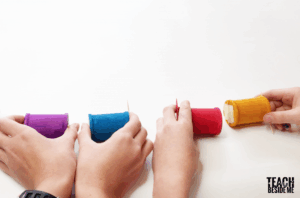
Welcome to Class

Today's To Do's:

  • Finish building your prototype
  • Have a peer look at your prototype and give you feedback

View Full Page

Welcome to Class! 

Today's Tasks:

  • Finish your prototype

  • Create a test to evaluate your prototype

  • Test your peer's prototype/Peers test your prototype

  • Evaluate your solution - improve your design based on your feedback you were given

  • Click HERE for slides showing ideas for testing


View Full Page

Welcome to Class!! Please Excuse Mrs. Moore

Today's Tasks:

  • Finish your prototype and test it (see paper copy for testing in your box Noah and Alex and see info slides from yesterday)
  • Work on slides presentation that you will share with your peers
    • Click HERE for project slide guidelines and checklist to help you complete your slide show
Update Week 4 in your portfolio and add your slides presentation as an artifact for today. Please remember to share it with anyone who has the link so I can open it.

View Full Page

Welcome to Class!!

Are we able to present our Shoe for YOU Project today?

  • Do we need to work on slides presentation that you will share with your peers
    • Click HERE for project slide guidelines and checklist to help you complete your slide show

Update Week 4 in your portfolio

  • Add your slides presentation as an artifact for today if you did not add it as an artifact yesterday.
  • Please remember to share it with anyone who has the link so I can open it.
  • Make sure your daily comments are at least one FULL sentence.

View Full Page

This content is password-protected. To view it, please enter the password below.

View Full Page

Week 5 | Sept 14 - Sept 18 | Edit Week 5 accordian - Rotate Days / Change Dates or Style [must be logged in] Edit the Week 5 Post Page [add header/ footer content]

Welcome to Class!

Today is the DAY --- for SHOE 4 U Project Presentations

  • Any last minute fixes or changes? 10  mins to get ready to present
  • Presentations - Be a confident presenter and a attentive audience member today!
  • Create WEEK 5 in your portfolio and put link to your project in today's comments.


View Full Page

Welcome to Class!   

Today in class we are going to finish Shoe4You Project Presentations

With the time left in class after the presentations review the following:

  • Make sure that Week 4 is done and you have set up Week 5 Sept 15th - 19th
  • Activity 0.2.1 Technical Drawings click HERE to log in to PLTW
    • Open PLTW link and go to Activity 0.2.1 and follow directions
      • Set up Onshape account
      • Open sneaker file
      • Learn how to make a logo on the side of your sneaker

View Full Page

Welcome To Class

Today we are going to continue to learn about shoe accessories and On Shape

Click HERE to open the Activity 0.2.1 google document
Click HERE to log into PLTW and go to Activity 0.2.1 Technical Drawings
  • Learn about how to use Onshape CAD software
  • Create a custom logo on your sneaker
  • Explore and customize any other features of your sneaker
  • Make a Multiview with dimensions for your sneaker


View Full Page

Welcome to Class!! 

Today we are going to try to finish our Sneaker Logo and Customizing on Onshape

Click HERE to open the Activity 0.2.1 google document
Click HERE to log into PLTW and go to Activity 0.2.1 Technical Drawings (need help with Onshape)
  • Create a custom logo on your sneaker
  • Explore and customize any other features of your sneaker
  • Make a Multiview with dimensions for your sneaker
Add link to your completed document to your portfolio as an artifact, make sure to share with anyone who has the link 🙂

View Full Page

Welcome to class!

We made it to FRIDAY-

Today we are going to help the Robotics Team by finishing construction on the field.

Please make sure WEEK 5 is updated in your portfolio - Thanks 😉

View Full Page

Week 6 | Sept 21 - Sept 25 | Edit Week 6 accordian - Rotate Days / Change Dates or Style [must be logged in] Edit the Week 6 Post Page [add header/ footer content]
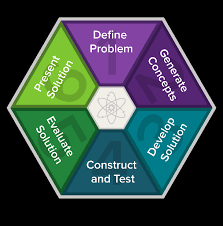
Welcome to Class!

Today we are starting UNIT1:

  • Introduction to new unit

  • Agriculture and Machines

  • Farmer Fran's Frustrations!!

    • Click HERE for you EGG-cellent Problem to SOLVE  and Your next CHALLENGE!


View Full Page

Welcome to Class -

Today we are continuing the Confetti Egg Challenge:

  • Construct Prototype
  • Create a poster in CANVA to inform the public about your new egg retrieving tool
  • Click HERE to see information on your EGG-cellent Problem to SOLVE


View Full Page

Welcome to Class - You got this today!!!

Confetti Egg Challenge FINAL DAY

  • Make sure you have a working prototype to share with the class
  • Click HERE for you EGG-cellent info on what you need on the CANVA POSTER and check out the grading rubric.
  • Complete your CANVA POSTER and put a link to it on your portfolio for WEEK 6

Sales Pitches will be the last 20 min of class

View Full Page

Welcome to Class - EGG-xcited to see sales pitches!  

Today's Tasks:

  • Watch and present your EGG-cellent sales pitches
  • What is simple about a COMBINE?
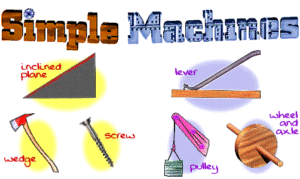
    • 6 simple machines jigsaw


View Full Page

Welcome to Class!

Today's Tasks:

  • Finish SIMPLE MACHINE notes
  • Can we see the other EGG-cellent devices?

How to EARN teambuilding:

  • Finish CANVA POSTER (You will not be eligible for team building until you present your project.) 
  • Week 6 done in your portfolio 
    • Have a link to your CANVA Poster on your portfolio this week
    • Comments for each day - true reflection of what you have done each day in class and at least 1 full sentence
  • Meet 1 on 1 with Mrs. Moore at front computer to show Portfolio Completion

View Full Page

Week 7 | Sept 28 - Oct 2  | Edit Week 7 accordian - Rotate Days / Change Dates or Style [must be logged in] Edit the Week 7 Post Page [add header/ footer content]
Welcome to Class! 

Today we are going to:

  • Machine Mania Challenge
  • How do I calculate MA?
  • How do you calculate IMA and AMA?
  • Calculation Practice with a Partner


\


View Full Page

Welcome to Class!  

Today's Objectives:

  • Finish Calculation Practice
  • Once we get done with calculations then review the SIMPLE MACHINES TRIO PROJECT and start researching.
    • Click HERE to get information about this project.


View Full Page

Welcome to Class!  

Today is our PROJECT DAY!

SIMPLE MACHINE TRIO PROJECT:
Research, Make a List, Go Shopping, Construct, and make a Video
        Click HERE to get project instructions

View Full Page

Welcome To Class!

FINISH the TRIO PROJECT

SIMPLE MACHINE TRIO PROJECT: Finish Constructing your machines and make your Video - have fun and be creative  🙂

  • You can use the phones to record your video and upload to Canva to edit.
  • Click HERE to get project instructions

View Full Page

Welcome to Class!! 

Today's Plan:
  • Update Week 7 in Portfolio 
  • Meet with Mrs. Moore to review Week 7 
     Explore and Recharge Time (ER)

View Full Page

Week 8 | Oct 5 - Oct 9 | Edit Week 8 accordian - Rotate Days / Change Dates or Style [must be logged in] Edit the Week 8 Post Page [add header/ footer content]
Welcome To Class!

Today we are going to do the following:

  1. Grab Materials:
    • Get your Chromebook and engineering notebook.
  2. Take Notes:
    • Click HERE pen the Google Slides for today.
    • Take notes in your notebook on energy, work, and power.
  3. Do Problems:
    • Click HERE for the 3 practice problems.
    • You will need to make a copy of the document so that you can copy/paste photos of your work and answers to the document
    • Solve all 3 problems in your notebook.
  4. Take Photos:
    • Use a classroom phone to take pictures of your work.
    • Send the pictures to your school email and add them to your document
  5. Add to Portfolio:
    • Go to the computer lab.
    • Set up Week 8 in your portfolio.
    • Add your assignment document link to Monday’s entry.
    • Include a comment about what you did in class.
  6. Need Help?
    Ask the guest teacher—they have the
    answer key to help you.


View Full Page

Welcome to Class!

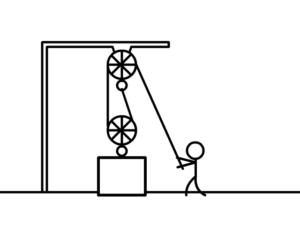
Today's Challenge - Powerful Pulleys

  • Click HERE to open a slideshow about Pulleys, review the slide show and take notes in your engineering notebook
  • Click HERE to get access to today's assignment and the document in Onshape
    • Get as much done as you can of the pulley assignment. At the end of class please send an email to Mrs. Moore to let her know what you got done today on this assignment.

View Full Page

Welcome to Class!

Today's Challenge - Powerful Pulleys

  • Click HERE to open a slideshow about Pulleys, review the slide show and take notes in your engineering notebook
  • Click HERE to get access to today's assignment and the document in Onshape
    • Get as much done as you can of the pulley assignment. At the end of class please send an email to Mrs. Moore to let her know what you got done today on this assignment.


View Full Page

Welcome to Class! 

1) Pulleys - Some of you need to finish up work from yesterday, if you need links from yesterday's assignment, click back and view yesterday's instructions.

2)  Here are Today's Objectives:

  • Design, construct, and solve for simple and compound gear trains.

  • Apply knowledge of gears and gear ratios to design gear trains to optimize speed or torque.

You will be taking a few notes about gears, so get out your engineering notebook and click HERE for the slide show.
Next you will be doing a Gear Challenge Level 1 today to learn about how to construct gear trains, click HERE to access the document to work on today.

View Full Page

Welcome to Class!  You made it to the end of the week!

Today YOU will:

  • Finish your Gear Challenge Level 1 today to learn about how to construct gear trains, if you were absent yesterday please  click HERE to access the document to work on today.
  • Make sure Week 8 is updated in your portfolio. 
    • You should have complete comments for each day
    • Your artifacts this week should include: 3 problems done for Energy, Power, and Work, Pulleys Activity, and Gears Activity.
  • Explore and Recharge Time (ER Time)
    • Show the guest teacher your portfolio that it is completed for Week 8 with daily comments in FULL sentences and your artifacts of problems, pulley activity, and Gears activity are done.
    • Then you have met the requirements for Explore and Rest time to play games, design something, work on homework, etc


View Full Page

Week 9 | Oct 12 - Oct 16 | Edit Week 9 accordian - Rotate Days / Change Dates or Style [must be logged in] Edit the Week 9 Post Page [add header/ footer content]


Welcome Back! Happy Friday!!

  • Make sure Earthquake data recon is ready to go for Monday. We will start with your presentations.

  • Update Portfolios - Make sure that they are complete to end Q1

    • Make sure to have complete sentences for each day of the week
    • Links to completed assignments this week:  Gear challenges Levels 1 and 2 and EQ data
    • Show Guest teacher completed EQ research and completed Week 9 Portfolio
    • If there is time left you can have Exploration and Recharge (ER) Time

View Full Page

Welcome Back to class!

  • We are shifting gears for a few days to learn about Earthquakes and buildings designed to withstand EQ's

  • Pick a partner (one group of 3), to do some reconnaissance to gather info today
    • Click HERE to access your documentation, please make a copy and share with your partner(s).
    • Follow directions and get as much info as you can today.

View Full Page

Welcome Back to Class!

Today we are going to work to FINISH Level 2 Gear Challenge

  • Finnish creating gears and filling out data table
  • Complete your report at the end of the document
  • Place a link of your completed document into your portfolio
  • Email Mrs. Moore to let her know where you left off today, to help her decide what will be best for tomorrow 🙂 

View Full Page

Welcome Back to Class!

Today we are going to pick up where we left off:

  • Gear Challenge Level 2 - Exploring Gears as you CREATE them.
  • If you were absent yesterday or did not get to start Level 2 click HERE to open your copy of Level 2 Challenge.
  • Please make your own copy of this document that you can type in.
  • Add comments to update what you did today in your portfolio, make sure to add a link to this assignment in your portfolio 

View Full Page

Welcome to Class!

Today's Objectives:

  • Apply knowledge of gears and gear ratios to design gear trains to optimize speed or torque.

Procedure:

  • Today we are going to pick up where we left off to finish Gear Challenge Level 1 get it finished and linked to portfolio
  • Then you are going to LEVEL UP to Level 2 - Exploring Gears as you CREATE them.
  • Click HERE to open your copy of Level 2 Challenge. Please make your own copy of this document that you can type in.
  • Make sure you add Week 9 in your portfolio and along with  your comments today add a link to your assignment. 


View Full Page